Streaming with Server-Sent Events
So I had this task at work. We have an API where clients submit image generation requests. The job gets queued, processed in the background, and at some point it’s done. The question was: how does the client know when it’s done?
Polling
The first approach was polling. My senpai had already built this before I got involved. The client submits a task, gets back a task ID, then hits GET /tasks/{id} every few seconds until the status changes.
Client: GET /tasks/abc-123        → { "status": "processing" }
Client: GET /tasks/abc-123        → { "status": "processing" }
Client: GET /tasks/abc-123        → { "status": "processing" }
Client: GET /tasks/abc-123        → { "status": "success", "output": [...] }
This is a valid approach. If you’re doing server-to-server communication, polling is often the right call. The caller controls the frequency, there’s no persistent connection to maintain, and it works with any HTTP client.
For our case though, image generation takes anywhere from 10 seconds to a few minutes. Most of those polls return “still processing.” Poll too often, wasted requests. Poll too slowly, stale UI. I wanted something where the server just tells the client when something changes.
SSE
Asked AI about it, and it suggested Server-Sent Events. Looking into it more, there’s also WebSocket, which gives you a full two-way channel. For chat apps or collaborative editors, that makes sense. But our case is one-way. The server pushes, the client listens. SSE fits that.
SSE is just HTTP. The server responds with Content-Type: text/event-stream, keeps the connection open, and writes data whenever it wants. No protocol upgrade, no special proxy config. It goes through load balancers and reverse proxies because it’s a regular HTTP response that doesn’t end.
The format is lines of text:
data: {"status":"processing"}

data: {"status":"success","output":["https://..."]}
Each event starts with data: followed by two newlines. You could read it with curl and it would make sense.
On the browser side, there’s a built-in called EventSource:
const source = new EventSource('/tasks/abc-123/stream');

source.onmessage = (event) => {
  const data = JSON.parse(event.data);
  console.log(data.status); // "processing", "success", etc.
};
Give it a URL, it handles the connection. If it drops, it reconnects on its own.
SSE, first try
So I looked into SSE and set up a StreamedResponse. The idea: instead of the client polling, keep one connection open and push updates from the server.
But in the first version, the stream itself was still polling. Inside the response closure, I was checking the database in a loop:
// First attempt (simplified)
return response()->stream(function () use ($task) {
    while (true) {
        $task->refresh();
        $this->sendEvent(['status' => $task->status->value]);

        if ($this->isTerminal($task->status)) {
            break;
        }

        sleep(2);
    }
}, 200, ['Content-Type' => 'text/event-stream']);
It worked. But it was basically the same thing as client-side polling, just moved to the server. The stream sits there hitting the database every 2 seconds. Not much better.
Adding Redis
The real change was making it event-driven. Instead of the stream checking the database, the background job publishes status changes to Redis, and the stream listens.
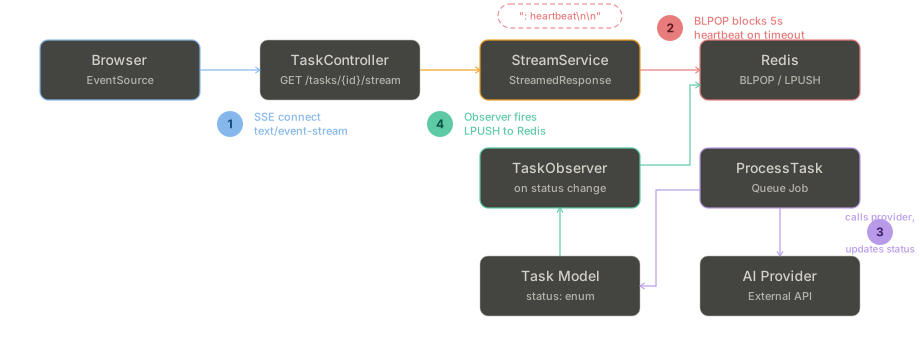
The job updates the Task model. A Laravel Observer watches for status changes and pushes to a Redis list. The stream blocks on that list, waiting for messages.
My first thought was Redis Pub/Sub. SUBSCRIBE on a channel and wait. But phpredis’s subscribe() takes a callback and never returns control. You can’t break out of the loop, can’t check if the client disconnected, can’t send heartbeats.
So we use LPUSH / BLPOP instead. BLPOP blocks for up to N seconds, then returns. If a message came in, you get it. If not, you get back control and can do whatever you need.
// Publishing (from the Observer)
$redis->lPush("task:{$taskId}:events", json_encode($data));
$redis->expire("task:{$taskId}:events", 300);

// Listening (from the stream)
while (! connection_aborted()) {
    $result = $redis->blPop([$channel], 5);

    if ($result === false || $result === []) {
        $this->sendHeartbeat();
        continue;
    }

    $data = json_decode($result[1], true);
    $this->sendEvent($data);

    if ($this->isTerminal(TaskStatus::tryFrom($data['status'] ?? ''))) {
        break;
    }
}
Every 5 seconds without a message, we send a heartbeat. In SSE, lines starting with : are comments. The browser ignores them, but they keep the TCP connection alive. Proxies and load balancers close idle connections after a while, so you need something flowing.
echo ": heartbeat\n\n";The expire on the Redis list is 5 minutes. If the client never connects or the stream crashes, the key cleans itself up.
The stream service
The full thing looks like this:
public function stream(Task $task): StreamedResponse
{
    return response()->stream(function () use ($task) {
        set_time_limit(0);

        $this->sendEvent(['status' => $task->status->value]);

        if ($this->isTerminal($task->status)) {
            $this->sendTerminalData($task);
            return;
        }

        $this->listenForUpdates($task);
    }, 200, [
        'Content-Type' => 'text/event-stream',
        'Cache-Control' => 'no-cache',
        'X-Accel-Buffering' => 'no',
    ]);
}
set_time_limit(0) because PHP’s default is 30 seconds. Image generation takes longer than that.
X-Accel-Buffering: no because Nginx buffers responses by default. Without this header, Nginx waits for the full response before sending anything. That breaks streaming.
One more thing: PHP buffers output. If you just echo, nothing reaches the client until the buffer fills or the script ends. You need ob_flush() for PHP’s buffer and flush() for the web server’s. Both.